

How Transparent Heaters Prevent Display Failure in Cold Environments
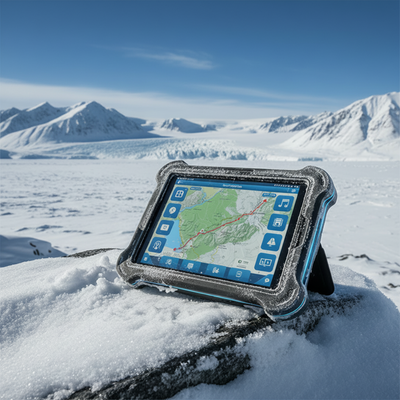
Imagine designing a ruggedized tablet for an Arctic research team or a dashboard for a snowplow fleet. The hardware specs look perfect on paper. The processor is fast, the casing is waterproof, and the battery life is stellar. The moment the device hits sub-zero temperatures, the screen goes sluggish; images ghost, refresh rates plummet, and eventually, the liquid crystals freeze entirely.
For design engineers and product managers working on outdoor or industrial electronics, cold environments create unique failure modes. It’s not just about keeping the battery warm; it’s about ensuring the primary user interface—the display—remains visible and responsive.
This post dives into the mechanics of why displays fail in the cold and how integrating a transparent heater for cold-weather applications can save your project from costly field failures. We will explore the physics of display freezing, the role of condensation, and how modern heating systems maintain optical clarity while not compromising ruggedness.
Why Cold Environments Kill Display Performance
Before we look at the solution, we need to understand the problem. Most modern industrial displays rely on Liquid Crystal Display (LCD) technology. The "liquid" in LCD is key here. These crystals exist in a state between solid and liquid, allowing them to reorient themselves when voltage is applied to block or pass light.
The Sluggish Response of Cold Liquid Crystals
As temperatures drop, the viscosity of the liquid crystal material increases. It becomes thick and syrupy, which slows down the time it takes for pixels to change state. When displays are exposed to cold temperatures, several performance issues can arise. First, ghosting is a frequent problem. Moving images can produce trails because the pixels cannot turn on and off quickly enough in the cold. Reduced contrast is another issue, as the liquid crystals may not completely rotate to their intended positions. This leads to washed-out colors and inferior black levels, diminishing the user experience. In severe cold, typically below -20°C or even -40°C depending on the specific liquid crystal fluid, the material can crystallize and become solid. When this occurs, the display ceases to function entirely and may even suffer irreversible damage.
Common Cold-Induced Display Issues
When displays are exposed to cold temperatures, several performance issues can arise. First, ghosting is a frequent problem. Moving images can produce trails because the pixels cannot turn on and off quickly enough at low temperatures. Reduced contrast is another issue, as the liquid crystals may not completely rotate to their intended positions. This leads to washed-out colors and inferior black levels, diminishing the user experience. In severe cold, typically below -20°C or even -40°C depending on the specific liquid crystal fluid, the material can crystallize and become solid. When this occurs, the display ceases to function entirely and may even suffer irreversible damage.
The Condensation and Frost Factor
Internal temperature regulation isn't the only battle. External environmental elements play a massive role in cold-temperature electronics.
When a device is moved from a cold environment to a warmer one, or when humidity levels change quickly, condensation forms. If the display's surface temperature is below the dew point, moisture collects on the glass. In freezing conditions, this moisture turns to frost or ice. This obscures the user’s view and interferes with touch functionality. Capacitive touchscreens rely on electrical changes at the surface. A layer of ice acts as an insulator, rendering the touch controller blind to user input. For mission-critical applications such as medical devices or heavy machinery controls, an unresponsive screen is a safety hazard, not just a simple inconvenience.
This obscures the user’s view and interferes with touch functionality. Capacitive touchscreens rely on electrical changes at the surface. A layer of ice acts as an insulator, rendering the touch controller blind to user input. For mission-critical applications such as medical devices or heavy machinery controls, an unresponsive screen is a safety hazard, not just a simple inconvenience.
The Role of Optical Heating in Display Design
The standard solution for keeping electronics warm is to heat the enclosure or the battery. However, this approach is inefficient for the display itself. Displays are often the outermost layer of a device, directly exposed to the cold ambient air. Heating the air inside the case doesn't effectively transfer heat to the front glass, where it is needed most.
This is where transparent heaters come in. By applying heat directly to the optical path (the display stack), you solve the problem at the source.
How Transparent Heaters Work
A transparent heater is essentially a resistor layer applied to a substrate (usually glass, polycarbonate, or polyester film) that generates heat when a current passes through it. The challenge for engineers is balancing two opposing forces: resistivity (to generate heat) and transparency (to let light through).
There are generally two main technologies used:
Types of Transparent Heaters
Wire-wound heaters utilize fine wires arranged in a precise pattern that generate heat as electricity flows through them. This allows the designer to place heat only where it is needed. While they are more effective at warming the display, one downside is that the wires can sometimes be faintly visible, resulting in visual noise or streaking on the display surface.
Thin-film coatings take a different approach. These use a transparent conductive oxide, such as Indium Tin Oxide (ITO), or conductive nanoparticles, applied across the entire surface. This technique provides reduced optical clarity but without the shadowing from wires as well as nearly uniform heating, making it ideal for applications where visibility and lower cost are more valued.
Achieving Display Freeze Prevention Without Distortion
Integrating a heater into an optical stack calls for careful consideration of visual performance. If the heater introduces haze, yellowness, or refractive distortion, you defeat the purpose of having a high-definition display.
Uniformity is Critical
Display freeze prevention isn't just about blasting heat; it's about applying it evenly. If a heater creates "hot spots," you risk damaging the LCD panel or creating localized color shifts.
High-quality transparent heaters are designed to provide uniform thermal distribution. This ensures the screen's corners warm up at the same rate as the center. This homogeneity is important for preventing stress fractures in the cover glass, which can occur if temperature differentials across the surface become too extreme.
Index Matching for Clarity
When you apply layers to a display stack, you create new boundaries where light can reflect. This reduces screen brightness.
Engineers combat this using index matching. By meticulously choosing adhesives and substrates with refractive indices similar to those of the glass and the heater layer, internal reflections are minimized. The result is a heating element that is virtually invisible to the user. The screen looks crisp and bright, even as the heater actively battles sub-zero temperatures.
Engineering Considerations for Integration
For product managers and design engineers, selecting the right heater requires considering the entire system. Here are key factors to consider when spec'ing a heater for your next build.
- Power Budgeting
In portable devices, every milliwatt counts. You don't want a heater that drains the battery in an hour.
Warm-Up vs. Maintenance Modes
Managing power consumption is important, especially in portable devices where each milliwatt counts. Often, a high-power "turbo" mode is necessary to quickly de-ice a frozen screen at startup. Once the display reaches a safe operating temperature, the system switches to a low-power "maintenance" mode to keep the screen just above the freezing point during normal operation. This two-stage approach harmonizes energy efficiency with reliable performance, guaranteeing the display is ready for both cold starts and continuous use in harsh conditions.
Sensor Integration
Modern smart heating systems are adaptive, using temperature sensors such as thermistors integrated directly into the heater assembly. Further, wire wound construction allows the designer to use the resistivity of the wire (which changes over temperature) to monitor the temperature without adding additional components.
This feedback allows the system to precisely modulate power. As a result, the heater is engaged only when necessary, boosting energy efficiency and extending battery life. This intelligent control is critical for preserving optimal display functionality without needless power drain.
- Ruggedization and Impact Resistance
If your device is destined for a construction site or a military vehicle, the heater adds a structural element to the display stack.
Lamination for Protection and Strength
Laminating heaters between layers of glass or plastic shields the heater element from damage and enhances the screen's overall durability. This method works like the safety layer in automotive windshields, providing additional impact resistance essential for rugged environments. By embedding the heater this way, the display gains both a protective barrier and improved physical stability, which is critical for devices used in harsh or high-impact settings.
Flexibility for Advanced Form Factors
For applications that require curved displays or flexible electronics, rigid glass heaters pose a significant limitation. In these situations, using flexible substrates such as polyester (PET) enables the transparent heater to adjust to various shapes and contours without cracking. This flexibility opens new possibilities for innovative device designs, ensuring the benefits of transparent heating extend to the most demanding use cases.
Case Examples: Where Heat Matters
To visualize the impact, let's look at a few cases where cold-temperature electronics rely on transparent heating.
Outdoor Kiosks and ATMs
Consider an ATM in Minnesota or an EV charging station in Norway. These machines sit idle for hours in freezing temperatures. Without a heater, the first customer of the morning would find a frozen, unresponsive screen. A heater triggered by a proximity sensor or timer ensures the screen is ready to transact the moment a user approaches.
Handheld Medical Devices
Emergency responders use handheld monitors and defibrillators in the field. If an ambulance is parked outside in winter, the equipment inside gets cold. A display that lags or ghosts could lead to misreading vital signs. Transparent heaters ensure life-saving data is instantly legible, regardless of ambient temperature.
Cockpit Avionics
At high altitudes, temperatures plummet. Pilots count on complex flight displays for navigation plus situational awareness. These displays must be absolutely reliable and free of fog or frost. High-performance heaters with anti-reflective properties are standard in this industry to ensure 100% visibility.
Outdoor LED Lighting and Signaling
Modern LED lights do not radiate heat in the way their predecessors do. While generally thought of as a good thing, this can be a problem in places where snow and ice can build up blocking the light from performing its task. A clear heater is applied to the exterior lens can help keep the light free of condensation, ice and snow when properly implemented. This style of heater cannot run very hot; therefore, the best use case is when combined with cloud connection allowing for the use of weather forecast data such that the heater is only engaged when it is needed instead of always on based on temperature alone. This could increase the lifetime of the product and reduce overall power consumption.
Solving the Cold Start Problem
One of the most critical tests for rugged electronics is the "cold start." This is when a device has been "soaked" in cold temperatures (sat off for a long time) and is then powered on.
Standard commercial displays will fail this test. They simply won't turn on, or the backlight will ignite, but the liquid crystals won't move.
A well-integrated transparent heater solves this by pre-heating the display. When the power button is pressed, the system directs power to the heater first. Within seconds, the liquid crystal fluid warms up enough to function, and the display initializes. This rapid response capability is a key differentiator for premium industrial hardware.
Conclusion: Don't Let the Cold Freeze Your Project
Designing for the cold is about more than simply survival; it's about performance. A rugged device that turns on but has an unreadable screen is a failed device.
Through integrating transparent heating technology, you ensure that your product delivers a consistent, premium user experience, whether it's operating in a temperature-controlled lab or on a frozen tundra. It prevents the physical freezing of liquid crystals, eliminates condensation and frost, and retains the fast refresh rates users expect.
When spec'ing your next display stack, look beyond the resolution and brightness. Ask yourself: How will this look at -30°C? If the answer isn't clear, it might be time to look into a heating solution.
Ready to ruggedize your display?
Explore Heatron’s advanced transparent heating systems and learn how we can help you preserve clarity and control in the harshest environments.